Trial in 30mins(new users)
This tutorial is mainly for new users, that is, users who are in the introductory stage of deep learning-related theoretical knowledge, know some python grammar, and can read simple codes. This content mainly includes the use of PaddleClas for image classification network training and model prediction.
Catalogue
1. Basic knowledge
Image classification is a pattern classification problem, which is the most basic task in computer vision. Its goal is to classify different images into different categories. We will briefly explain some concepts that need to be understood during model training. We hope to be helpful to you who are experiencing PaddleClas for the first time:
train/val/test dataset represents training set, validation set and test set respectively:
Training dataset: used to train the model so that the model can recognize different types of features;
Validation set (val dataset): the test set during the training process, which is convenient for checking the status of the model during the training process;
Test dataset: After training the model, the test dataset is used to evaluate the results of the model.
Pre-trained model
Using a pre-trained model trained on a larger dataset, that is, the weights of the parameters are preset, can help the model converge faster on the new dataset. Especially for some tasks with scarce training data, when the neural network parameters are very large, we may not be able to fully train the model with a small amount of training data. The method of loading the pre-trained model can be thought of as allowing the model to learn based on a better initial weight, so as to achieve better performance.
epoch
The total number of training epochs of the model. The model passes through all the samples in the training set once, which is an epoch. When the difference between the error rate of the validation set and the error rate of the training set is small, the current number of epochs can be considered appropriate; when the error rate of the validation set first decreases and then becomes larger, it means that the number of epochs is too large and the number of epochs needs to be reduced. Otherwise, the model may overfit the training set.
Loss Function
During the training process, measure the difference between the model output (predicted value) and the ground truth.
Accuracy (Acc): indicates the proportion of the number of samples with correct predictions to the total data
Top1 Acc: If the classification with the highest probability in the prediction result is correct, it is judged to be correct;
Top5 Acc: If there is a correct classification among the top 5 probability rankings in the prediction result, it is judged as correct;
2. Environmental installation and configuration
For specific installation steps, please refer to Paddle Installation Document, PaddleClas Installation Document.
3. Data preparation and processing
Enter the PaddleClas directory:
# linux or mac, $path_to_PaddleClas represents the root directory of PaddleClas, and users need to modify it according to their real directory.
cd $path_to_PaddleClas
Enter the dataset/flowers102 directory, download and unzip the flowers102 dataset:
# linux or mac
cd dataset/
# If you want to download directly from the browser, you can copy the link and visit, then download and unzip
wget https://paddle-imagenet-models-name.bj.bcebos.com/data/flowers102.zip
# unzip
unzip flowers102.zip
If there is no wget command or if you are downloading in the Windows operating system, you need to copy the address to the browser to download, and unzip it to the directory PaddleClas/dataset/.
After the unzip operation is completed, there are three .txt files for training and testing under the directory PaddleClas/dataset/flowers102: train_list.txt (training set, 1020 images), val_list.txt (validation Set, 1020 images), train_extra_list.txt (larger training set, 7169 images). The format of each line in the file: image relative path image label_id (note: there is a space between the two columns), and there is also a mapping file for label id and category name: flowers102_label_list.txt .
The image files of the flowers102 dataset are stored in the dataset/flowers102/jpg directory. The image examples are as follows:
Return to the root directory of PaddleClas:
# linux or mac
cd ../../
# windoes users can open the PaddleClas root directory
4. Model training
4.1 Use CPU for model training
Since the CPU is used for model training, the calculation speed is slow, so here is ShuffleNetV2_x0_25 as an example. This model has a small amount of calculation and a faster calculation speed on the CPU. But also because the model is small, the accuracy of the trained model will also be limited.
4.1.1 Training without using pre-trained models
# If you are using the windows operating system, please enter the root directory of PaddleClas in cmd and execute this command:
python tools/train.py -c ./ppcls/configs/quick_start/new_user/ShuffleNetV2_x0_25.yaml
The
-cparameter is to specify the path of the configuration file for training, and the specific hyperparameters for training can be viewed in theyamlfileThe
Global.deviceparameter in theyamlfile is set tocpu, that is, the CPU is used for training (if not set, this parameter defaults togpu)The
epochsparameter in theyamlfile is set to 20, indicating that 20 epoch iterations are performed on the entire data set. It is estimated that the training can be completed in about 20 minutes (different CPUs have slightly different training times). At this time, the training model is not sufficient. To improve the accuracy of the training model, please set this parameter to a larger value, such as 40, the training time will be extended accordingly
4.1.2 Use pre-trained models for training
python tools/train.py -c ./ppcls/configs/quick_start/new_user/ShuffleNetV2_x0_25.yaml -o Arch.pretrained=True
The
-oparameter can be set toTrueorFalse, or it can be the storage path of the pre-training model. WhenTrueis selected, the pre-training weights will be automatically downloaded to the local. Note: If it is a pre-training model path, do not add:.pdparams
You can compare whether to use the pre-trained model and observe the drop in loss.
4.2 Use GPU for model training
Since GPU training is faster and more complex models can be used, take ResNet50_vd as an example. Compared with ShuffleNetV2_x0_25, this model is more computationally intensive, and the accuracy of the trained model will be higher.
First, you must set the environment variables and use the 0th GPU for training:
For Linux users:
export CUDA_VISIBLE_DEVICES=0
For Windows users
set CUDA_VISIBLE_DEVICES=0
4.2.1 Training without using pre-trained models
python tools/train.py -c ./ppcls/configs/quick_start/ResNet50_vd.yaml
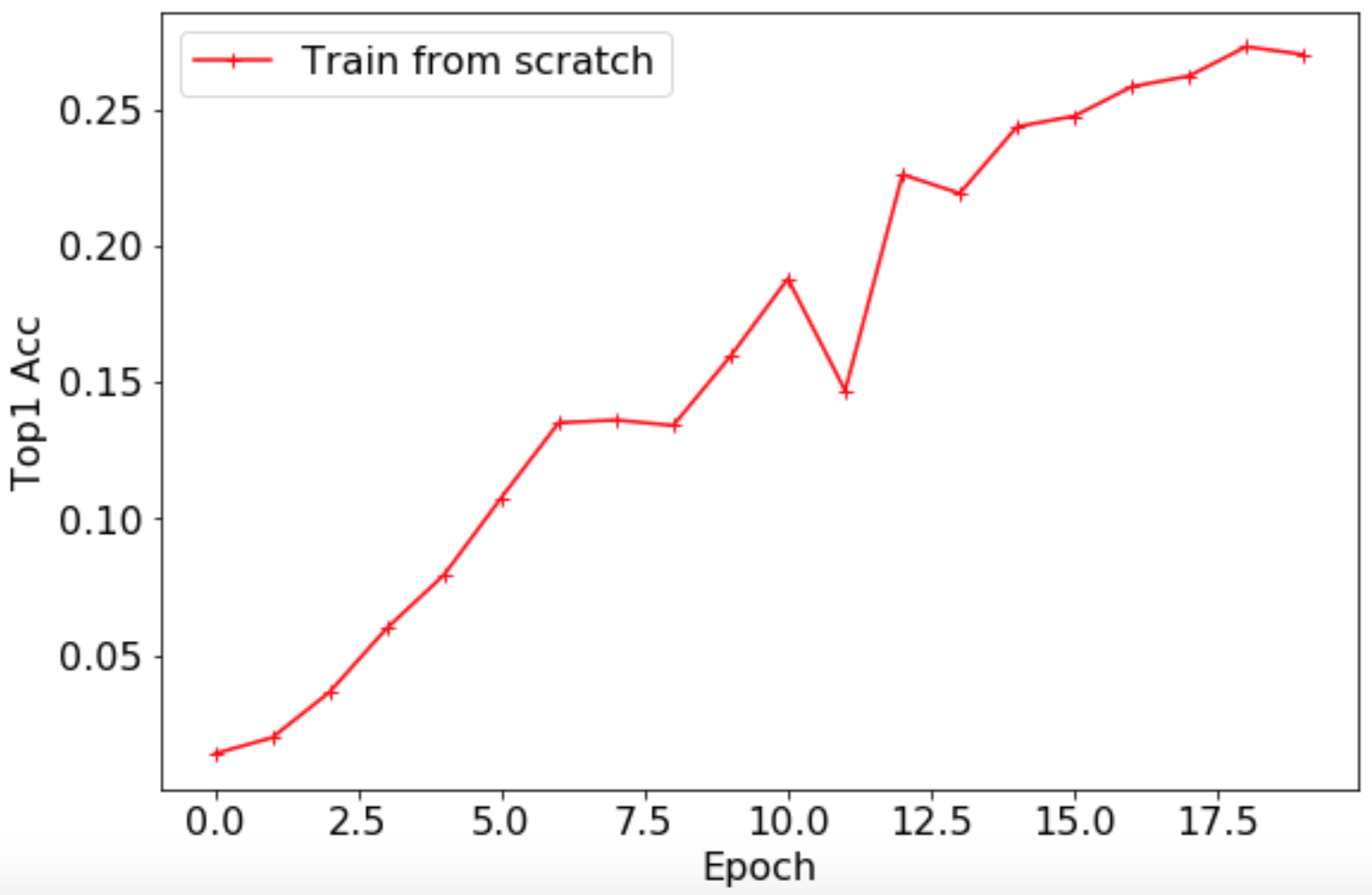
After the training is completed, the Top1 Acc curve of the validation set is shown below, and the highest accuracy rate is 0.2735.
4.2.2 Use pre-trained models for training
Based on ImageNet1k classification pre-trained model for fine-tuning, the training script is as follows:
python tools/train.py -c ./ppcls/configs/quick_start/ResNet50_vd.yaml -o Arch.pretrained=True
Note: This training script uses GPU. If you use CPU, you can modify it as shown in [4.1 Use CPU for model training] (#4.1) above.
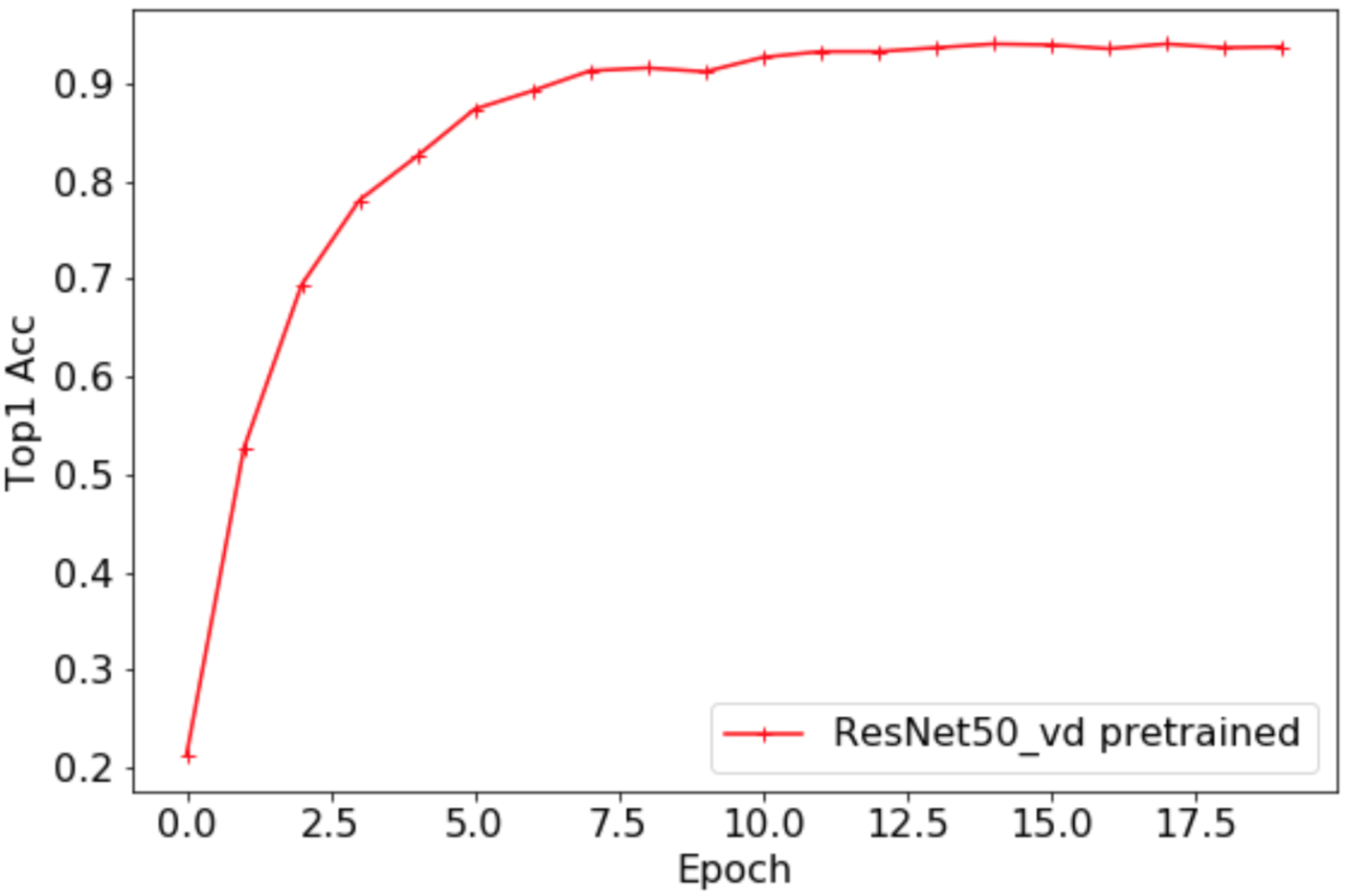
The Top1 Acc curve of the validation set is shown below. The highest accuracy rate is 0.9402. After loading the pre-trained model, the accuracy of the flowers102 data set has been greatly improved, and the absolute accuracy has increased by more than 65%.
5. Model prediction
After the training is completed, the trained model can be used to predict the image category. Take the trained ResNet50_vd model as an example, the prediction code is as follows:
cd $path_to_PaddleClas
python tools/infer.py -c ./ppcls/configs/quick_start/ResNet50_vd.yaml -o Infer.infer_imgs=dataset/flowers102/jpg/image_00001.jpg -o Global.pretrained_model=output/ResNet50_vd/best_model
-i indicates the path of a single image. After running successfully, the sample results are as follows:
[{'class_ids': [76, 51, 37, 33, 9], 'scores': [0.99998, 0.0, 0.0, 0.0, 0.0], 'file_name': 'dataset/flowers102/jpg/image_00001.jpg', 'label_names': ['passion flower', 'wild pansy', 'great masterwort', 'mexican aster', 'globe thistle']}]
Of course, you can also use the trained ShuffleNetV2_x0_25 model for prediction, the code is as follows:
cd $path_to_PaddleClas
python tools/infer.py -c ./ppcls/configs/quick_start/new_user/ShuffleNetV2_x0_25.yaml -o Infer.infer_imgs=dataset/flowers102/jpg/image_00001.jpg -o Global.pretrained_model=output/ShuffleNetV2_x0_25/best_model
The -i parameter can also be the directory of the image file to be tested (dataset/flowers102/jpg/). After running successfully, some sample results are as follows:
[{'class_ids': [76, 51, 37, 33, 9], 'scores': [0.99998, 0.0, 0.0, 0.0, 0.0], 'file_name': 'dataset/flowers102/jpg/image_00001.jpg', 'label_names': ['passion flower', 'wild pansy', 'great masterwort', 'mexican aster', 'globe thistle']}, {'class_ids': [76, 51, 37, 33, 32], 'scores': [0.99999, 0.0, 0.0, 0.0, 0.0], 'file_name': 'dataset/flowers102/jpg/image_00002.jpg', 'label_names': ['passion flower', 'wild pansy', 'great masterwort', 'mexican aster', 'love in the mist']}, {'class_ids': [76, 12, 39, 73, 78], 'scores': [0.99998, 0.0, 0.0, 0.0, 0.0], 'file_name': 'dataset/flowers102/jpg/image_00003.jpg', 'label_names': ['passion flower', 'king protea', 'lenten rose', 'rose', 'toad lily']}, {'class_ids': [76, 37, 34, 12, 9], 'scores': [0.86282, 0.11177, 0.00717, 0.00599, 0.00397], 'file_name': 'dataset/flowers102/jpg/image_00004.jpg', 'label_names': ['passion flower', 'great masterwort', 'alpine sea holly', 'king protea', 'globe thistle']}, {'class_ids': [76, 37, 33, 51, 69], 'scores': [0.9999, 1e-05, 1e-05, 0.0, 0.0], 'file_name': 'dataset/flowers102/jpg/image_00005.jpg', 'label_names': ['passion flower', 'great masterwort', 'mexican aster', 'wild pansy', 'tree poppy']}, {'class_ids': [76, 37, 51, 33, 73], 'scores': [0.99999, 0.0, 0.0, 0.0, 0.0], 'file_name': 'dataset/flowers102/jpg/image_00006.jpg', 'label_names': ['passion flower', 'great masterwort', 'wild pansy', 'mexican aster', 'rose']}, {'class_ids': [76, 37, 12, 91, 30], 'scores': [0.98746, 0.00211, 0.00201, 0.00136, 0.0007], 'file_name': 'dataset/flowers102/jpg/image_00007.jpg', 'label_names': ['passion flower', 'great masterwort', 'king protea', 'bee balm', 'carnation']}, {'class_ids': [76, 37, 81, 77, 72], 'scores': [0.99976, 3e-05, 2e-05, 2e-05, 1e-05], 'file_name': 'dataset/flowers102/jpg/image_00008.jpg', 'label_names': ['passion flower', 'great masterwort', 'clematis', 'lotus', 'water lily']}, {'class_ids': [76, 37, 13, 12, 34], 'scores': [0.99646, 0.00144, 0.00092, 0.00035, 0.00027], 'file_name': 'dataset/flowers102/jpg/image_00009.jpg', 'label_names': ['passion flower', 'great masterwort', 'spear thistle', 'king protea', 'alpine sea holly']}, {'class_ids': [76, 37, 34, 33, 51], 'scores': [0.99999, 0.0, 0.0, 0.0, 0.0], 'file_name': 'dataset/flowers102/jpg/image_00010.jpg', 'label_names': ['passion flower', 'great masterwort', 'alpine sea holly', 'mexican aster', 'wild pansy']}]
Among them, the length of the list is the size of batch_size.